

Types of Photo Booths for Events in Korea
Compare self-service and photographer-led booths, open and enclosed layouts, standard photos and AI transformations, plus print and digital delivery.
Event date
Search results often present “self-service,” “open-air,” and “AI photo booth” as if they were competing products. They are not. These labels describe different parts of the experience.
A booth can be self-service, use an open layout, and create an AI-transformed result at the same time. Choosing the right setup is therefore easier when you separate it into four independent decisions.
| Decision | Question | Common options |
|---|---|---|
| Operation | Who guides and controls the photo session? | Self-service / photographer-led |
| Space | Where does the guest stand and shoot? | Open / partitioned or enclosed |
| Result | What does the guest receive? | Standard photo / AI-transformed image |
| Delivery | How does the guest take it home? | Print / digital / both |
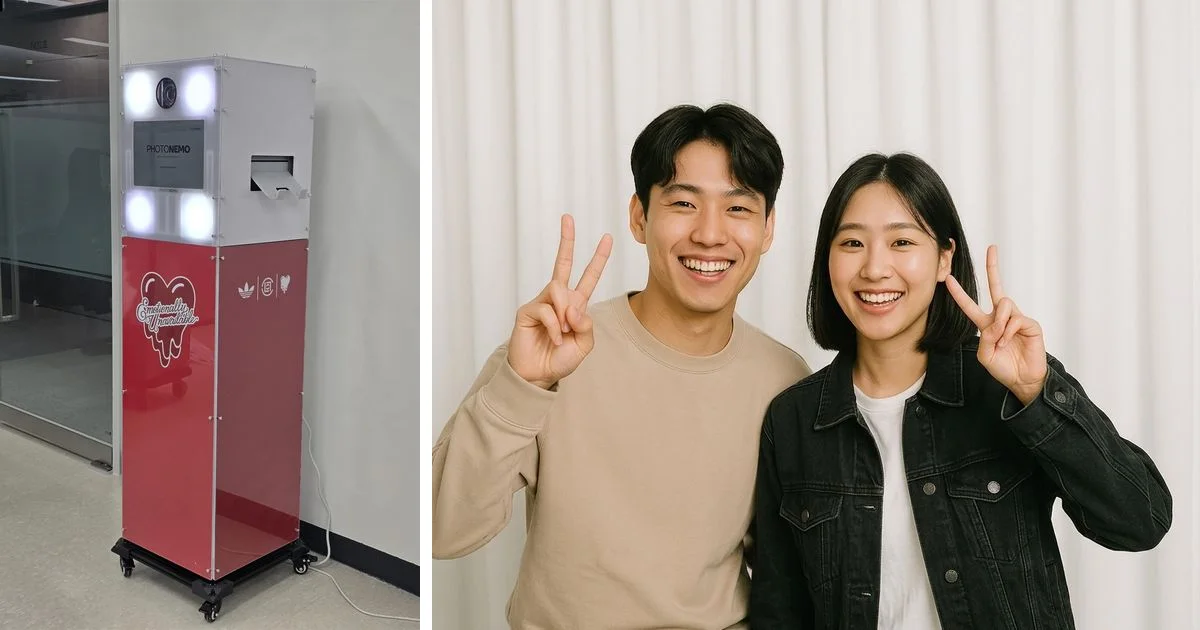
A PhotoNemo color kiosk and a photo example already published on our website. The booth exterior and the resulting image are separate configuration decisions.
This guide compares each decision and shows how to combine them around your event goal, venue, and expected demand.
1. Operation: Self-Service or Photographer-Led
Self-service
Guests follow on-screen instructions, pose, take photos, and select a result themselves. A repeatable flow makes it useful when many guests should receive the same branded experience.
Self-service does not automatically mean lower image quality. The result depends on the camera, lens, lighting, shooting distance, focus, image processing, printer, and paper. A self-service booth using a DSLR and controlled lighting is not equivalent to a booth relying on a built-in webcam.
The interface must still be understandable to a first-time guest. Confirm who will manage the queue, replace print media, and respond to errors even when the booth is described as unattended.
Photographer-led
A photographer controls the camera and adjusts posing, framing, and lighting for each group. This can work well for official records, VIP portraits, or situations that require individual direction.
The conversation and adjustment take time, so throughput may be lower. A photographer’s presence alone does not guarantee quality; review work made with the actual camera and lighting setup proposed for your venue.
| Factor | Self-service | Photographer-led |
|---|---|---|
| Guest journey | Guests follow the screen | Photographer directs each group |
| Consistency | Easier to repeat one setup | Easier to vary posing and framing |
| Throughput | Can be high with a short flow | Must include direction and adjustment time |
| Staffing | Unattended, host-assisted, or staffed by contract | Photographer and, when needed, an assistant |
| Strong fit | Repeatable participation and branded experiences | VIP portraits, official records, custom direction |
How to choose: Use self-service when many guests should move through a consistent experience. Use photographer-led operation when individual direction matters more. Large events can run the two as separate stations.
2. Space: Open or Partitioned
Open layout
The booth and shooting area remain visible to the venue. Guests in line can understand the experience by watching others, and the booth itself can become part of the event design. Open layouts also make it easier to use a wide backdrop or accommodate groups.
They are more exposed to ambient lighting and foot traffic. Measure the camera-to-subject distance and queue, not only the footprint of the machine. Avoid placing the setup directly beside a bright exhibition light, loudspeaker, entrance, or registration bottleneck without testing it.
Partitioned or enclosed layout
Curtains, walls, or partitions separate the shooting area from the venue. This can reduce visual pressure on guests and make ambient light easier to control.
The structure adds requirements: loading access, doorway width, ceiling height, emergency routes, wheelchair access, ventilation, and queue placement. An enclosed space does not by itself solve privacy. Screen visibility, consent, and photo-data handling still need separate controls.
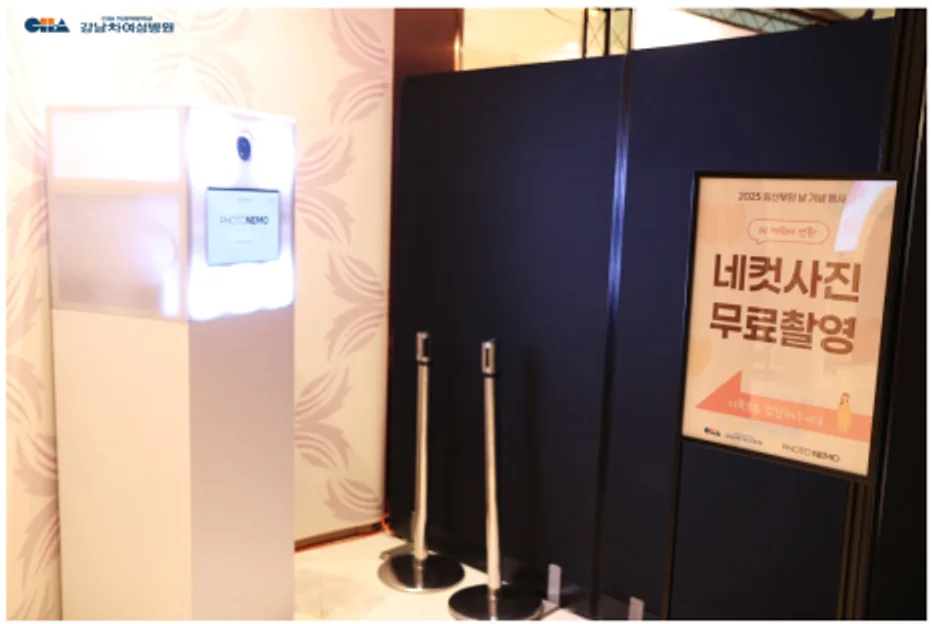
The same standalone kiosk can be combined with partitions when the venue requires a more separated shooting area.
| Factor | Open | Partitioned or enclosed |
|---|---|---|
| Atmosphere | The activity attracts attention | The session feels more private |
| Group photos | Easier to expand the backdrop and distance | Limited by the interior size |
| Light control | More affected by the venue | Easier to block ambient light |
| Planning focus | Shooting distance and queue | Loading, access, safety, and interior space |
| Strong fit | Pop-ups, exhibitions, festivals, brand activations | Privacy-sensitive sessions and controlled lighting |
How to choose: Use an open layout when visible participation supports the event. Consider partitions when guest comfort or lighting control is more important.
3. Result: Standard Photo or AI Transformation
Standard photo
The captured photo is color-corrected and combined with a frame, logo, or filter. It is the better starting point when the guest’s real appearance and the event setting should remain recognizable.
Standard photo booths still have operational risks. Camera connections, lights, printers, media, storage, and download delivery all need testing and a fallback plan.
AI-transformed image
An AI workflow uses the captured person as input and creates a new image with a different outfit, background, character, or illustration treatment. It is useful when guests should enter a campaign world that cannot be built physically at the venue.
The generated result can differ from the original person, and details can vary between outputs. Test multiple samples under conditions similar to the event. Check faces, hands, clothing, and required brand elements. Build styles from approved brand assets and an event-specific visual direction rather than asking the system to imitate a protected character or artist.
Do not judge capacity from “AI generation time” alone. Measure the entire session: capture, selection, request, processing, review, retry, and print or download. Also ask whether processing is local or server-based and what happens when the internet connection fails.
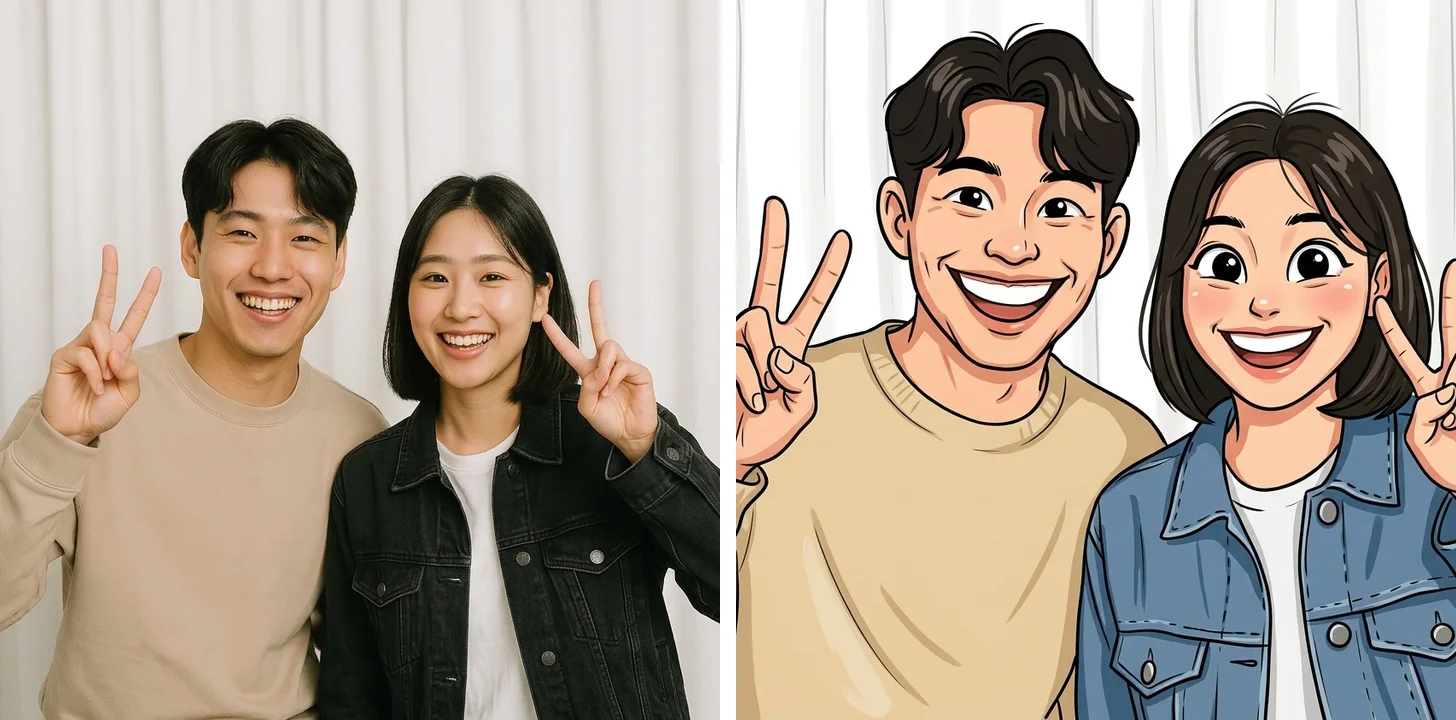
Standard photo on the left and an AI caricature transformation on the right. AI changes the result workflow; it does not define who operates the booth.
| Factor | Standard photo | AI-transformed image |
|---|---|---|
| Result | The captured person and scene | A newly generated image based on the capture |
| Strength | Familiar and faithful documentation | New experience and campaign-world expression |
| Testing | Camera, light, frame, print | All standard checks plus output quality and latency |
| Dependencies | Camera, printer, storage, delivery | Standard dependencies plus processing and network |
| Fallback | Digital delivery or spare equipment | Standard-photo mode, retry, or later delivery |
How to choose: Choose standard photos when faithful documentation matters. Add AI when the transformed result is essential to the experience. A single session can provide both.
4. Delivery: Print, Digital, or Both
On-site print
A physical print becomes an immediate souvenir, and its frame can carry the event name and brand. Confirm the included print quantity, extra media, reprint rules, and printer-failure response.
Digital delivery
Guests save their result through a QR code or link. It is convenient for sharing and avoids print consumables, but the network and download page must work reliably. Confirm link expiration, original-file availability, data handling, and a support contact.
Both
Guests receive a physical print and save the same result to their phone. This is convenient but adds selection, printing, and QR steps. Verify their impact on the complete session time.
Calculate Capacity from Expected Demand
There is no universal answer to “How many groups per hour?” The number changes with photo count, retakes, AI choices, result review, printing, and download steps.
Prepare these inputs:
- Expected photo groups, not only total guest count
- Actual operating hours after breaks, performances, and closing procedures
- Complete time per group, from the first tap to result handoff and reset
- Peak windows such as opening, intermission, or the end of a program
Use a simple first estimate:
Capacity per booth per hour = 3,600 seconds / complete seconds per group
Required groups per hour = expected photo groups / actual operating hours
Booths required = required groups per hour / capacity per booth per hour
For events with concentrated demand, compare a shorter guest flow with operating multiple booths.
Round the result up and leave room for peak demand. Ask the provider for a measurement from a real event configuration, not a short demo showing only the image-processing step.
Starting Combinations by Event Goal
These are starting points, not fixed packages.
| Event goal | Combination to consider first | Verify before approval |
|---|---|---|
| Make participation visible at a pop-up | Open + self-service + standard or AI + digital | Brand continuity across booth, screen, and result; queue |
| Handle high demand at an exhibition or festival | Open + short self-service flow + multiple booths if needed | Peak throughput and traffic distribution during failures |
| Add fun and a souvenir to a corporate event | Self-service + standard/AI choice + print/digital | How extra choices affect session time |
| Produce VIP or official portraits | Photographer-led + lighting set + standard photo | Delivery standard, portfolio, and separate waiting area |
| Reduce visual pressure on guests | Partitioned + simple flow | Accessibility, screen shielding, and data handling |
| Put guests inside a brand world | Open or set-based + AI + custom screen and frame | Samples, prohibited outputs, retry and fallback rules |
How PhotoNemo Configures These Choices
PhotoNemo’s public product line starts with standalone kiosks that guests operate through an on-screen flow. We select a configuration from the intended result and venue conditions rather than asking clients to choose a model name first.
- Color Standard: designed for corporate events and brand activations that need high-quality color capture and printing, AI transformations, and custom booth, screen, and frame design.
- B&W Mini: a compact option for smaller events that want a simple monochrome result.
- Configurations outside the published lineup: if the experience requires a photographer, a separate set, or a custom participation flow, we review the goal and venue before confirming feasibility.
See PhotoNemo products for the published equipment and setup conditions. To request a recommendation, send the date, venue, operating hours, expected photo groups, and intended result through our contact page.
Final Checklist
- What should guests experience and take away?
- Does self-service or photographer-led operation fit that goal?
- Is there enough room for equipment, shooting distance, backdrop, and queue?
- Can the setup handle expected photo groups and peak periods?
- Are print quantities, extra media, and digital-link expiration explicit?
- Is there a fallback for power, network, printer, or processing failure?
- Has the complete flow been tested with the proposed event settings?
- Are consent, retention, use, and deletion of photo data explained?
- Do the booth exterior, screen, frame, and result form one brand experience?
Choosing a photo booth is not about finding the trendiest label. It is about combining who operates it, where guests shoot, what result is created, and how that result is delivered.
Planning an Event in Korea from Abroad?
PhotoNemo supports events held in South Korea and works with global agencies through English communication. We can coordinate an English quotation, commercial invoice, payment documents, venue requirements, branding files, and event-day guidance.
Share the Korean venue address, schedule, expected photo groups, desired result, and artwork status through our contact page. We will map those requirements to a workable setup before confirming the scope.