

AI Transformation
Turning captured photos into a different art style or background — what we build vs. what you send us, plus scope and limits.
The AI turns the captured photo into a different art style or places it on a different background.
The most common point of confusion is where our work ends and your input begins, so that comes first.
Who prepares what
| We build it | You send it | |
|---|---|---|
| Style transformation | Every transformation that turns people into characters, illustrations and so on | A reference image, if there is a brand character or a specific outfit |
| Background — a mood or vibe | Tell us the mood you want and we generate it with AI | (nothing) |
| Background — a specific place or structure | A photo or image of that place | |
| Background — solid color | Applied once you pick the color | The color code |
The test — does it have to be exactly that?
If the real thing must appear exactly — Gwangan Bridge, your event stage, a specific building — send us an image. If only the mood is decided ("spring, cherry blossoms drifting"), we create it for you.
Images you send should be JPG or PNG, in the highest resolution available — they end up on a print.
Background style examples
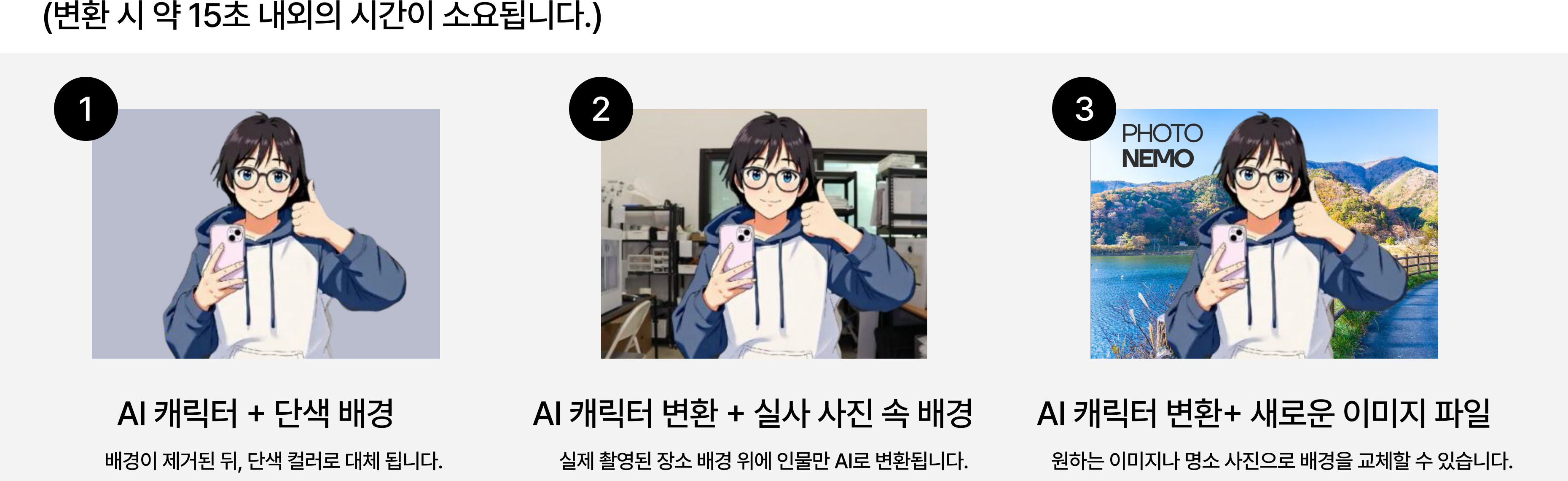
Pick from these, or just describe the mood you have in mind.
Scope and limits
| Item | Value |
|---|---|
| Number of new backgrounds | Up to 4 per event — guests choose one when they shoot |
| AI cuts per frame | 1 cut per printed frame is AI-transformed |
| The other cuts | Print as captured |
| Within one frame | Different transformations cannot be mixed across cuts |
| Transformation time | About 15 seconds after the shot |
| When guests choose | The style is picked before shooting |
One AI cut per frame
On a 4-cut frame, one cut is AI-transformed and the other three are the original photos. To show the AI image at a larger size, we recommend the Landscape-3 frame with its big cut.
Preparing several backgrounds
Guests can pick a background at the booth. Regional events often prepare several local landmarks; brand events often prepare one background per product line.
More than 4 choices slows guests down and builds a queue — 2 to 4 is the sweet spot.
You can also skip AI entirely
AI transformation is optional. Run the event with standard shooting and printing and that cost drops out. If AI does not fit the event, or the budget needs trimming, just tell your manager.
Frequently asked
Do you create the backgrounds with AI, or do we have to supply images? Both work. See the table above for which is which.
Can each cut in one frame get a different AI transformation? No. One frame carries one AI cut, in the single style the guest selected.
So on a 4-cut frame, one cut is the AI background and the other three are original photos? Correct.
Can we preview the result? Yes — we run a test shoot before the event and share the actual output. That is why we ask you to finalize the AI setup 7 days before the event.
Can it transform guests into a specific person or a copyrighted character? Not as-is, for rights reasons. If your brand owns the character, ask us with a reference image.
For the full range of what the AI can produce, see the AI guide.